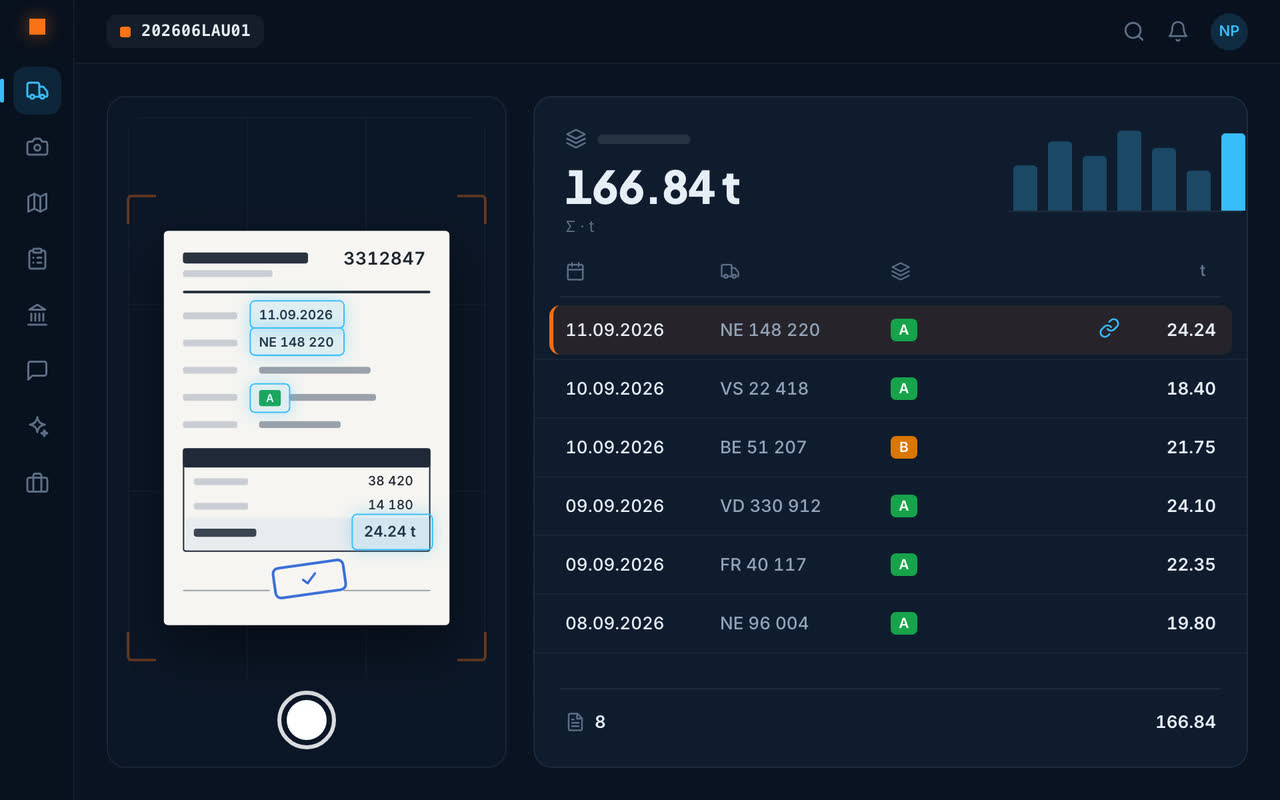
From paper ticket to dashboard
1. The driver photographs the ticket
From the truck, in two seconds, even offline: the ticket waits on the phone and is sent when the network returns.
2. The AI reads the ticket
Haulier, date, material, quantity, disposal site – captured without typing, from a photo or a PDF.
3. The summary builds itself
By haulier, by material, by disposal site, with the site's charts and tonnages.
4. The file is ready
Excel export and summary for the site file or the client, in one click.
Weighings, transports and duplicates
The weighbridge ticket and the transport ticket of the same trip are matched automatically; duplicates are flagged, never silently discarded. An illegible ticket or a weighing reported by phone can be entered by hand or dictated.
Waste sorting you can prove
Waste types under the waste movement ordinance (VeVA/OMoD) and disposal sites are already in the app. Every tonne removed is linked to its site, its material and its destination: the traceability of excavated material and construction waste can be proven, ticket by ticket.
The assistant also answers the question: “how many tonnes have left the site?” – it adds up the tickets for you.
Frequently asked questions
How do I digitise a site's disposal tickets?
With Geovio, just photograph the ticket with the app: the AI reads the haulier, date, material, quantity and disposal site, and files the ticket under its site. No manual entry is needed.
Can tonnages be exported for the client?
Yes: the summary by haulier, material and disposal site exports to Excel, ready to attach to the site file.
What if the ticket is illegible?
It can be entered by hand or dictated; so can a weighing reported by phone.
Are weighbridge and transport tickets matched?
Yes: the two tickets of the same trip are combined automatically, and duplicates are flagged.