One month free
You pay for the year up front: eleven months paid, twelve months of subscription.
Your sites forget nothing.
Geovio is opening up to its first ten companies. Those who equip their teams now come in at the launch price — and do not pay for all twelve months of the year.
You pay for the year up front: eleven months paid, twelve months of subscription.
From five Bureau or Premium licences: ten months paid, twelve months of subscription. The threshold triggers on its own, there is nothing to negotiate.
You appear as a launch partner, among the companies that led the way.
The foundation is shared — your projects, your teams, your photos. Each person opens the modules their trade needs.
From the paper slip handed to the driver to the dashboard, without a single manual entry.
2Thousands of site photos, and the one you need found in three words.
3The surveyor's plan places itself where it belongs, and the site is read on top of it.
4The bill of quantities is built from the NPK catalogue positions, and any document you receive can be uploaded and questioned.
5SIMAP monitoring filtered to your trade: what concerns you rises to the top, the rest costs you nothing.
6A bubble at the bottom left of the app. You write to it or talk to it: it finds, answers, drafts — and sends nothing without your consent.
7Quotes, QR invoices, reminders, hours, payroll: running a Swiss SME, in the same app as your sites.
From the paper slip handed to the driver to the dashboard, without a single manual entry.
From the truck, in two seconds. Even offline.
Haulier, date, material, quantity, disposal site — captured without typing.
By haulier, by material, by disposal site, with charts.
Excel export and summary, for the site file or the client.
Only one person acts: the haulier, who photographs his slip. Everything that follows happens with no one lifting a finger.
In a dead zone, the slip waits on the phone and sends when the signal returns.
Haulier, date, material, quantity, disposal site. A photo or a PDF.
The two slips from the same trip are matched, duplicates are flagged.
Already in the app: waste sorting becomes demonstrable.
For an illegible slip or a weight announced by phone.
For the site file or the client, in one click.
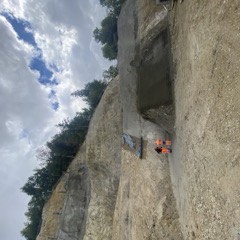
From the phone, with position and time. Even offline.
Location, equipment named by function, materials, issues.
The word you search for need not appear in the photo, and the date is typed in the same phrase.
Every photo in its place on the site, ready for the report.
On a photo of a plant, the app gives the species, its Latin name and the list it appears on — black or watch list. Enough to spot an invasive neophyte before it spreads with excavation material.
Here too, only one person acts: the one who presses the shutter. Description, indexing and mapping happen on their own.
'Digger' brings back a mechanical excavator, 'house' the photos that show one.
'Digger 13/4/26' or 'oil stains March 2026' are searched in one go.
Position and date recorded at the shutter, visible on the site map.
Identifies the species and its list — black or watch list.
A photo can be sent into a conversation, with read receipts.
Pick photos, and the site report is written from their findings.
The surveyor's plan places itself where it belongs, and the site is read on top of it.
A Swiss surveyor's plan carries its national coordinates. Geovio reads them and places the drawing where it belongs, with no manual alignment. Its transparency can be adjusted to read the aerial photo underneath.
AutoCAD's format cannot be read by a browser: the server converts it to DXF on upload, and keeps both side by side.
Project perimeters in dashed lines, calculated areas, trees at the actual diameter of their canopy. The map exports as an image, ready to attach to a report.
The bill of quantities is built from the NPK catalogue positions, and any document you receive can be uploaded and questioned.
Upload what you have to read — a full tender file, the minutes of a site meeting, a contract, a report — then ask your questions in plain language. Every answer cites the document and the page it rests on, and says plainly when the document has no answer. You question the document instead of reading it in full.
SIMAP monitoring filtered to your trade: what concerns you rises to the top, the rest costs you nothing.
'Earthworks and pipework in Valais' is enough: the search terms and CPV codes compose themselves, and adjust if the first sort misses the mark.
Your won contracts are read once and for all: they describe your field better than any form, and refine what is suggested to you.
A shortlisted tender goes to Analyse: the file is broken down there, and the bill of quantities is composed in Tenders. Nothing to re-enter in between.
A bubble at the bottom left of the app. You write to it or talk to it: it finds, answers, drafts — and sends nothing without your consent.
It opens it, or shows you the way to the screen that holds it.
It answers questions about the tender files filed in the project.
It prepares the draft; you read it over before anything goes out.
Ask for the total of a site's slips: it adds them up for you.
It attaches the document and sends it, once you have confirmed.
On site, you talk to it; at the office, you write to it.
Anything that sends or deletes waits for your confirmation. The assistant prepares; you decide.
Quotes, QR invoices, reminders, hours, payroll: running a Swiss SME, in the same app as your sites.
Offers, orders, invoices and credit notes follow on from one another, with nothing re-entered.
Every invoice carries its QR-bill, and reminders are prepared for those still open.
The invoice you receive is read for you: all that is left is to check it.
The camt statement is imported, and each payment finds its invoice.
Payslips and salary certificates.
Stock, time-and-materials slips signed on site, the teams' hours.
Reserved for the company director: only the account that runs the company opens the ERP — the teams have no access to it.
For the foreman, the machine operator, the haulier. Take out the phone, take a photo, put it away. Filing, location, sending: it all happens without a second thought.
They send themselves as soon as the signal returns. You can close the app.
For the works manager, the environmental officer, the works supervision, the client. Photos arrive sorted by site, located and time-stamped — and the whole platform is open.
Company, engineering firm, environment, client: everyone works in the same site file. Each person gets a code that serves as both username and password — no email to enter, no password to remember.
Four organisations, one site. Everyone signs in with their code and finds the same slips, the same photos, the same reports — with no file or email exchange.
One per person. It opens the app: it is both the username and the password. Its prefix carries the role, and thus the matching permissions.
One per site. The works manager gives it to a haulier, who joins the site by entering it — with no one having to create an account.
No more photos sent by email or WhatsApp groups where nothing can be found. Conversations live in the site file, alongside the slips and the photos.
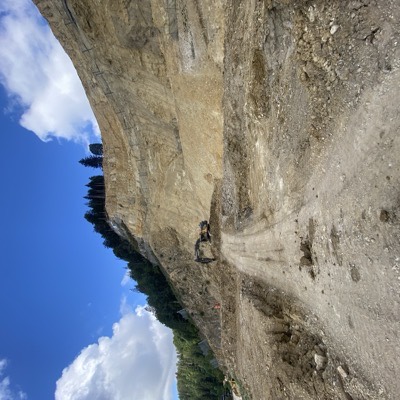 Here's how it looks this morning.
 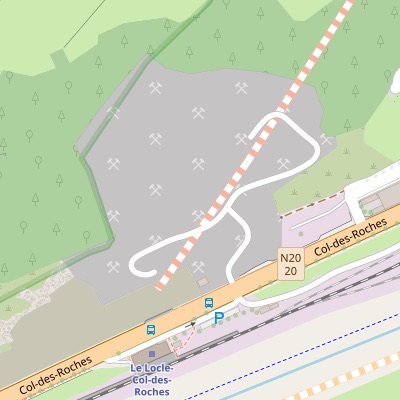 © OpenStreetMap Could you take a photo of this area?
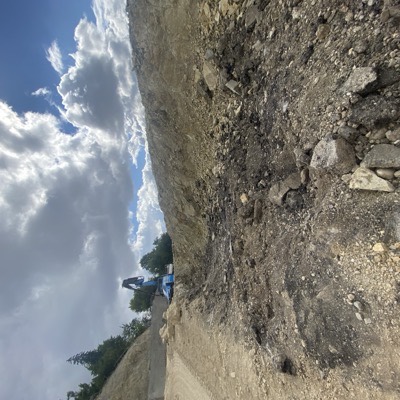 Here you go, have a good day.
 Everyone is in it, without anyone having to add them. An account created today joins the conversation on its own.
Created together with the site, with the full team. Conversations stay attached to the right file, and leave with it.
One to one or in a small circle, for what needn't go past everyone. You join only by invitation.
Geovio is Swiss construction site management software, on the web and as an iOS and Android app. It brings together in one tool AI-read disposal slips and materials management, site photos described and found in a few words, LV95 georeferenced plans, bills of quantities from the CAN catalogue, SIMAP public tender monitoring, an assistant you can write or talk to, and business management: quotes, invoices with Swiss QR-bill, hours, daywork reports and payroll.
Yes. The Business management (ERP) module handles quotes, orders, invoices with the Swiss QR-bill, credit notes and reminders; it reads supplier invoices and matches payments from the bank. The hours and T&M reports from the site become invoices without retyping anything. Only the general ledger (balance sheet, ledger) stays with your fiduciary, to whom everything exports.
For construction, civil engineering, earthworks and public works companies, landscapers, engineering firms, site supervisors and project owners in Switzerland. The foreman, machine operator or truck driver takes photos on site; the site manager, the office and management find everything filed.
Yes. Geovio follows each mandate from the fee proposal to the last invoice: hours are recorded against the lines of the won quote, progress shows in colour, and deposit invoices and QR-bills follow without retyping. The contact book (CRM) keeps each client's quotes and invoices, and the office also finds tender documents queried, NPK/CAN bills of quantities, SIMAP monitoring and photo follow-up of the sites.
In Switzerland: servers and storage in Zurich and Geneva, compliant with the Swiss FADP (nLPD). The company owns its data and can export all of it at any time.
Pricing is per person, with no base fee. At the launch price: Terrain licence at CHF 15 per person per month (25.– afterwards), Bureau licence at CHF 89 per seat per month with all modules (99.– afterwards), Premium licence at CHF 178 with twice as much AI assistant. No commitment, cancellable every month.
The truck driver photographs the disposal or weighing slip. The AI reads the carrier, date, material, quantity and disposal site, matches the weighing and transport of the same trip and flags duplicates. Waste types (VeVA/OMoD) and disposal sites are already in the app: waste sorting becomes demonstrable, and the summary exports to Excel for the site file or the project owner.
Yes. In dead zones, photos and slips wait on the phone and are sent automatically as soon as the network returns. Nothing is lost.
Yes. Everyone records their hours against the lines of a won quote, in the app, at the office or by voice. The manager follows each mandate line by line and invoices the hours worked in one click, with the Swiss QR-bill.
In French, German, Italian and English, for the whole of Switzerland.


Your teams log in with their access code.